
Multi-level approvals you can see through.
Every step shows who holds it, how long they have held it and what happens next, so nothing sits in an inbox unnoticed.
Capabilities
How chains are built
Rules, not hardcoded names
Route by amount, category, department or entity, so the chain keeps working when someone changes role.
Delegation and escalation
Cover assigned during leave, and automatic escalation when a step is held longer than your threshold.
Full visibility on every step
The requester sees where their request is without messaging anyone, which removes the follow-up entirely.
Held actions for the agent
Anything the agent prepares that touches money, exits or compliance stops here for a human decision.
In the product
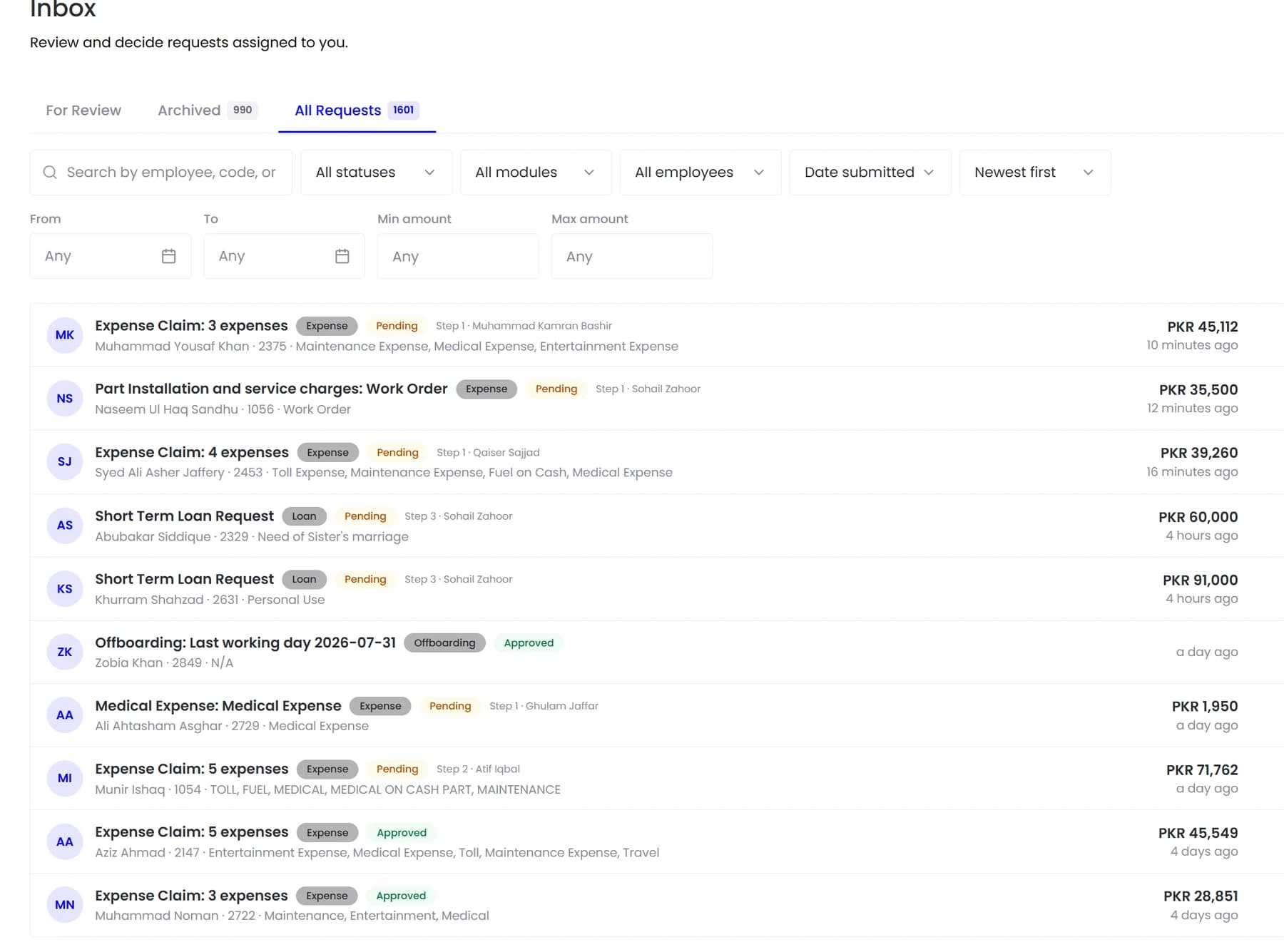
One inbox across every module, showing which step each request is on and who is holding it.
Approvals are where good processes go to die. Not because anyone refuses, but because a request sits in an inbox and no one knows it is waiting until someone asks.
- Rules, not hardcoded names
- Delegation and escalation
- Full visibility on every step
- Held actions for the agent
How it fits together
Why requests stall, and what fixes it
Approvals are where good processes quietly die. Not because anyone refuses, but because a request sits in an inbox and nobody knows it is waiting until the person who raised it asks about it.
- Routing by rule
- Delegation and escalation
- Held actions
Approvals
Nothing stalls silently
Teamio makes the state of every request visible to everyone on the chain, including the person who raised it.

By the numbers
What it looks like in practice
The point of routing a request to a person is that a person applies judgement. Everything around that, the chasing, the reminding, the working out who is next, is overhead that should not need a human at all.
1
Inbox across every module
Any
Number of steps per chain
Auto
Escalation past your threshold
0
Requests chased by message
In practice
What the chain looks like in motion
A single expense claim moving through a three-step chain, and what each participant sees.
The employee submits
They see the chain ahead of them and which step it is on, so the follow-up message asking where it has got to never gets sent.
Step one, the manager
Receives it with enough context to decide in seconds rather than needing to open three other screens first.
Step two, finance
Sees the claim with the policy check already applied, so the question is whether to approve rather than whether it complies.
Held too long
If a step sits beyond your threshold it escalates automatically, which is what stops a single person's absence stalling everything behind them.
Settled
The approved claim reaches payroll without anyone re-entering it, and the full decision history stays on the record.
Compared
What the inbox shows
One queue across every module, rather than a different inbox per request type.
FAQ
Common questions
Can we see how long approvals typically take?
Yes. Each step records when it was received and when it was decided, so the bottleneck in a chain is visible as data rather than as a general sense that approvals are slow.
Can one request need more than one approver?
Yes. Chains can have as many steps as your policy requires, and each step records who approved it and when, so the full history is available afterwards.
What happens when an approver is on leave?
Delegation assigns cover for the period, and escalation moves a request on automatically if it is held past your threshold, so nothing waits on one person's return.
See it running on your own data.
We will show the module working against records that look like yours, not a generic demo.