
Create a run, review it, approve and pay.
Each pay period becomes a run you can review before anything is paid, with its status visible from draft through to paid.
Capabilities
How a run moves
Create the run for a pay period
Pick the period and schedule, and the run is assembled from attendance, leave, overtime, expenses and loan deductions already on the record.
Review every payslip
Open the run and read the payslips it produced, with the working behind each figure available rather than summarised.
Move it through approval
The run carries a status from draft to approved to paid, so at any moment it is clear what stage it is at and who has it.
Pay, publish and archive
Payslips published to self service, journals exported to finance, and the run sealed with its figures intact for audit.
In the product
Every pay period as a run, with its schedule, pay date and current status.
Payroll goes wrong most often in the gap between preparing the numbers and paying them. A spreadsheet is finalised, someone makes a late correction, and the file that goes to the bank is not quite the file that was reviewed.
- Create the run for a pay period
- Review every payslip
- Move it through approval
- Pay, publish and archive
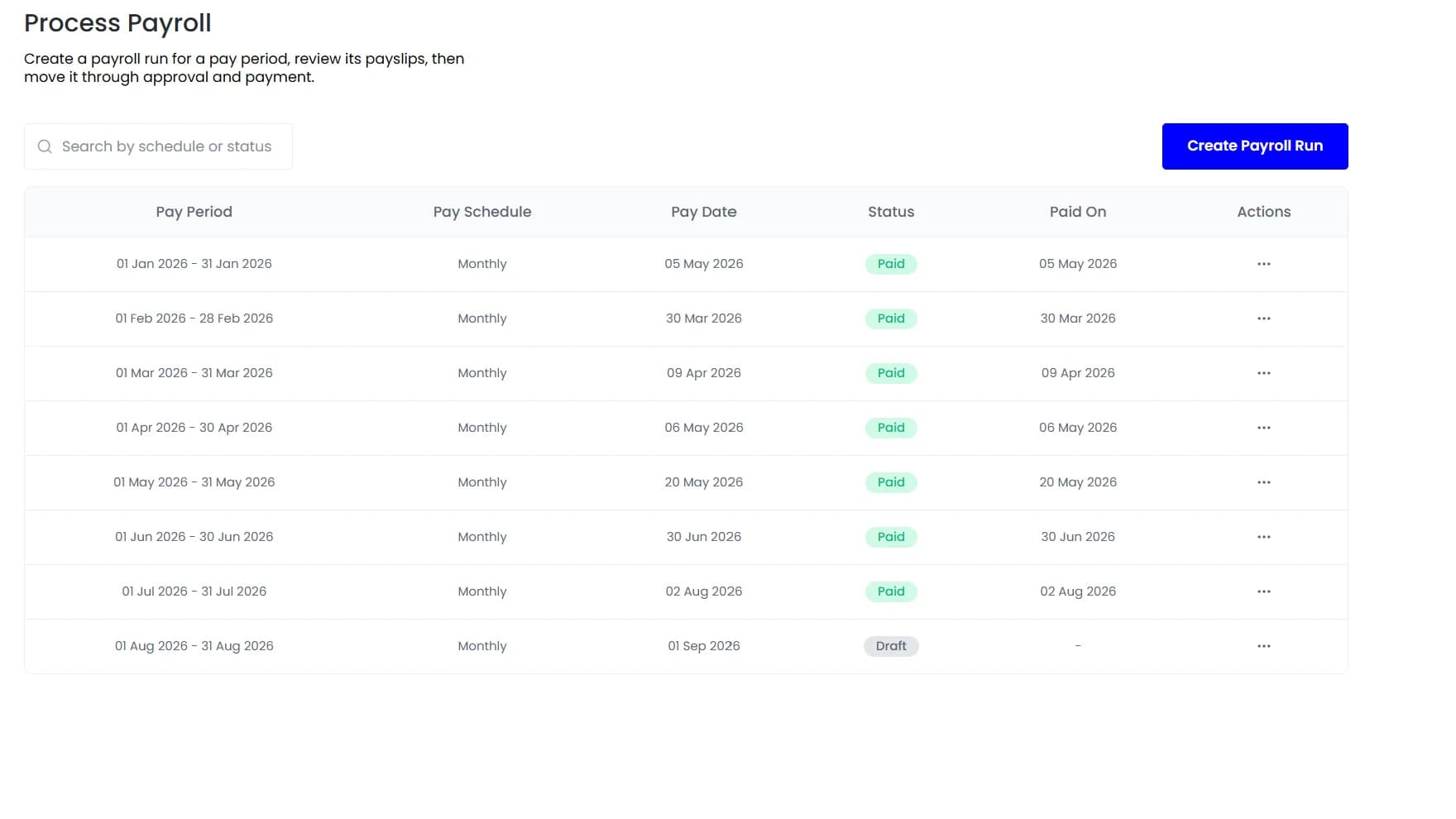
Payroll runs
Nothing is paid before it is reviewed
Teamio makes the run itself the object that moves through the process, so what was reviewed is what gets paid.
By the numbers
What it looks like in practice
Because the run keeps its inputs rather than just its totals, a payslip from eighteen months ago can still be traced back to the clock events, leave and adjustments that produced it.
4
States from draft to paid
Every
Payslip reviewable before approval
Flagged
Anomalies before payment
Sealed
With its inputs, for audit
In practice
One cycle, start to finish
The same sequence every period, with the run itself moving through the states rather than a file being passed around.
Inputs accumulate
Attendance, approved leave, overtime, settled expenses and loan deductions land on the period as they happen, so there is no collection step at the end.
The run is created
Assembled from those inputs for the period and schedule, producing payslips that can be opened and read rather than a summary to take on trust.
Anomalies surface
Overtime well above someone's own average, a missing timesheet or an out-of-policy claim are flagged before approval rather than after payment.
A person approves
One decision on a reviewed run, which is the point of the whole sequence. Everything before it is preparation, and preparation does not need judgement.
Paid and sealed
Payslips published, journals exported, and the run archived with its inputs intact so any figure can be traced back later.
Compared
A run moves through four states
The status is visible at every point, so nobody has to ask where payroll is.
FAQ
Common questions
Can we run an off-cycle payment?
Yes. An off-cycle run handles corrections, final settlements and one-off payments without editing a run that has already been approved and paid.
Can we run payroll for multiple entities at once?
Yes. Entities can run on the same schedule with their own local rules applied, or on separate schedules where the cycles genuinely differ.
What if we find an error after approval?
A correction is made as an adjustment in the next run or as an off-cycle run, both of which leave the original intact rather than editing history.
See it running on your own data.
We will show the module working against records that look like yours, not a generic demo.