
Reimbursements without the chase.
Snap a receipt and the agent reads the amount, date and vendor. Policy decides the route. Approved claims settle with the next payroll run.
Capabilities
How a claim moves
Receipt capture that reads the receipt
Amount, date, vendor and tax pulled from a photo, so the employee confirms rather than types.
Per-category budgets with live limits
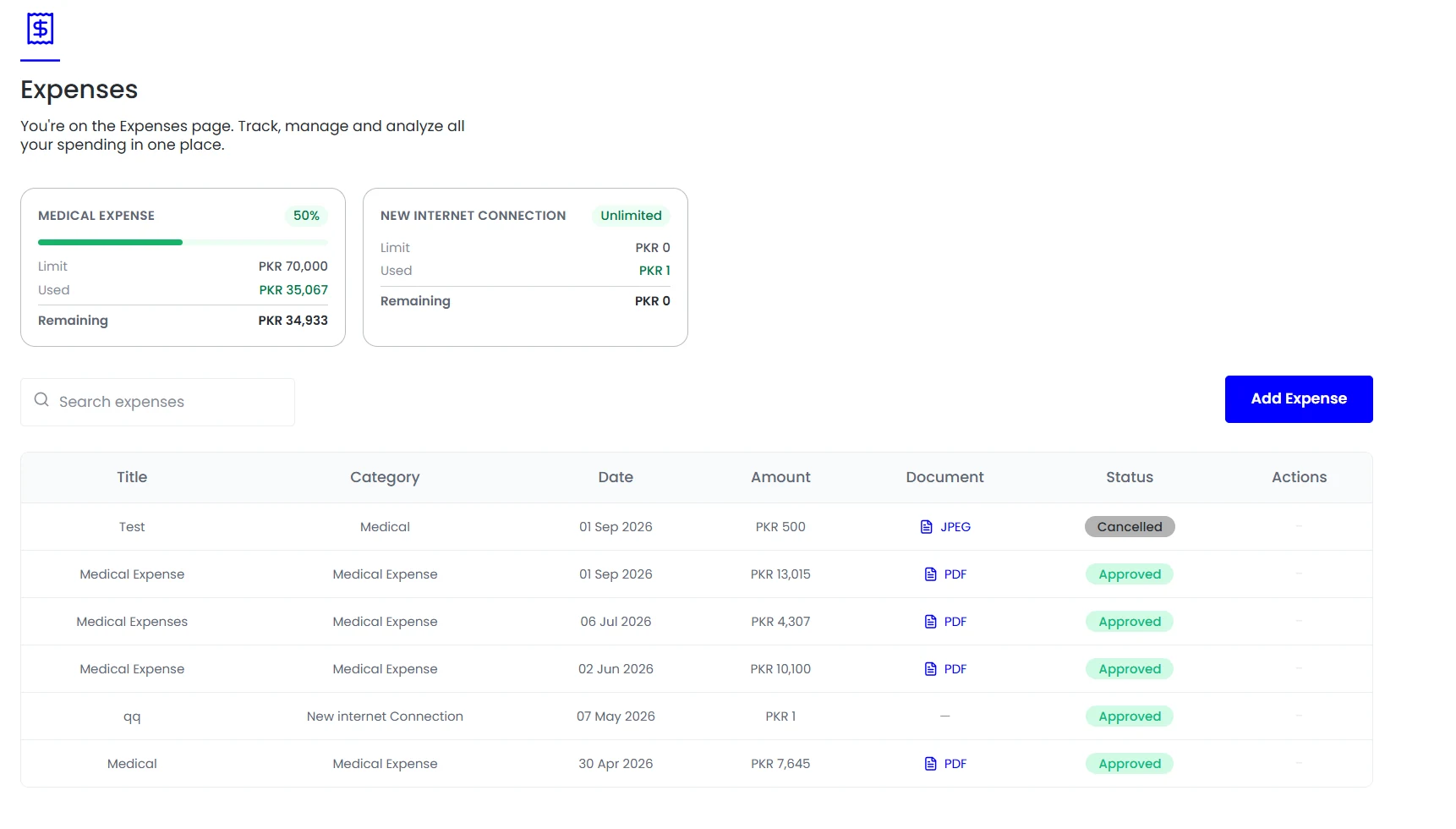
Medical, travel and equipment budgets showing the limit, what is used and what remains, to the person spending it.
Policy routing, not inbox routing
Value, category and department decide who approves. Out-of-policy claims are marked for review before they reach anyone.
Settlement through payroll
Approved claims flow into the next run and appear on the payslip, so there is no separate payment to reconcile.
In the product
Per-category budgets showing limit, used and remaining, next to every claim and its document.
Expense processes usually fail in one of two directions. Either they are so strict that people stop claiming and quietly absorb costs, or so loose that out-of-policy spend is only discovered once it has already been paid.
- Receipt capture that reads the receipt
- Per-category budgets with live limits
- Policy routing, not inbox routing
- Settlement through payroll
How it fits together
Moving the policy check earlier
Expense processes fail in one of two directions. Either they are strict enough that people stop claiming and quietly absorb costs, or loose enough that out-of-policy spend is only discovered once it has been paid and recovering it is awkward.
- At submission
- During approval
- At settlement
Expenses
Spend checked before it is paid
The fix is to move the check earlier. Teamio categorises the claim on submission and applies your policy before anything reaches an approver.

By the numbers
What it looks like in practice
Teams that travel claim in the currency they spent. Conversion is applied at a rate you control and recorded alongside the original amount, so the audit trail shows both.
Snap
Receipt read on submission
Live
Budget limit, used and remaining
Before
Policy checked ahead of approval
Payroll
Settled with the next run
In practice
A claim, end to end
From the moment a receipt is handed over to the point the money appears on a payslip.
The receipt is captured
Photographed at the point of spend rather than three weeks later. Amount, date, vendor and tax are read from the image, so the employee confirms rather than types.
Category and policy applied
The claim is categorised on submission and checked against the limit for that category, so an out-of-policy item arrives at the approver already flagged.
Routed by rule
Value, category and department decide who approves, which means an approver sees the claims that genuinely need judgement rather than everything from their department.
Approved and settled
The claim flows into the next payroll run and appears on the payslip, removing the separate transfer and the reconciliation that goes with it.
Recorded for audit
The document stays attached to the claim, so a question months later is answered by opening the record rather than searching an inbox.
Compared
Claims handled separately against claims settled with payroll
The difference shows up most clearly at month end.
FAQ
Common questions
What happens to a claim that breaches policy?
It is marked before it reaches an approver, with the rule it breached shown. The approver can still approve it as an exception, and that decision is recorded rather than being invisible.
Can employees claim in another currency?
Yes. The claim keeps the original amount and currency alongside the converted figure at a rate you control, so the audit trail shows both rather than only the result.
What stops duplicate claims?
Receipts are matched on amount, date and vendor, so the same receipt submitted twice is flagged at the point of submission rather than found during reconciliation.
See it running on your own data.
We will show the module working against records that look like yours, not a generic demo.